2016年7月20日星期三

Any Component - Abstraction of Computational Thinking

In App Inventor, we cannot copy components. So if there are a bunch of components that have same properties, you need to set them one by one, that really makes you frustrated.  So we look for the similarities between the components, figure out what things are different, remove out differences, that calls abstraction in Computational Thinking. We can use AnyComponent to fulfill it. Here are two examples:

Xylophone:


UI:

Before set the width, Fontsize and FontBold:


We have 8 same buttons. Set width, FontSize and FontBold to the button's properties.


After the screen initialized:


MoleMash:  


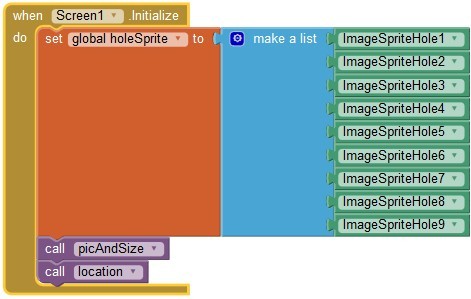
We have nine holes that has same size, same picture, and regular arrangement.


So we set it in blocks:


If you want to edit the properties of these components, you only do it at one time, one place. Cool, isn't it?


2016年6月22日星期三

2016 Google CS4HS Shenzhen


My three-day CS4HS workshop was held last week. More than 40 teachers came to have the training. Most of them are novices on App Inventor.

Two weeks before the workshop, I began to recruit participants.  Even though we don't offer credits in the training, but there are a lot of teachers applying for the training. A lot of participants are core teachers of Shenzhen, also include our discipline instructor and researcher of Shenzhen Education Bureau.
 
I have established an online course in advance. After recruiting, I let all participants encroll the course so they can begin to study immediately.


At the first day morning of training, a freshman of Shenzhen Institute of Information Technology showed to control a drone with mobile phone, the app was created with custom feature of App Inventor that developed by himself. Fantastic!

The next three days, I trained teachers on Computational Thinking, Setting Up App Inventor, How to open an App Inventor course in your own lab, Designer and Blocks Editor, Packaging and Sharing Apps,Lego and Arduino with App Inventor, aslo some interesting tutorials.


Teachers are making their own apps.


Everyone need to make a final project, they may collaborate with other teachers. At the last day afternoon, they presented their works : UI, Codes, Features, Improvement, Creative Ideas, all well done!


After training, they completed a survey about the workshop. The feedback is quite good. And they also gave me a lot of suggestions for improving the workshop. I'm so appreciate of that.

In the future, I would make a connection with Shenzhen Education Bureau and let more teachers to take part in further training.


2016年5月17日星期二

Science Festival


The Science Temple
Every year we have two Disciplines Festival, the autumn term is Art Festival, the spring term is Science Festival. So this term is Science Festival. The junior and senior part of our school have different activities. In junior part one of the activities of the Science Festival is a "Science Temple", a gathering of all students to take part in a lot of interesting games within half a day.


Of course our computer science discpline is one of the most attractive areas! The students lined up for playing games.

So happy to play the fruit piano!

Our robotic club design some interesting games to attract their classmates to play.

The spinwin: Using Arduino robot kits. When you press the green button, the spinwin begins to whirl, then you press red button, the spinwin whirls down slowly, finally stops in an area which indicates the game you should play: Tank, Elephant, Fruit Piano, Stamp and Try again.
   
 Touch the fruit to play a note, create your own song!
Lego Tank: You have only 60 seconds to push four items into a goal. If you push one item into a goal, you can get one stamp on your game card, and so on.
 
Lego Elephant: Make the elephant to roll up a candy stick then put it into the blue fence. If you succeed, you can get a stamp on your card.
Students use apps installed on the smart phone to control the LEGO Robots. The apps are written by our robotic club members, using App Inventor Platform. But the edition is a bit different from the official one. We cooperate with Shenzhen Institute of Information Technology, develope a local server edition, add LEGO EV3 and Arduino components in designer.
 Blocks of Tank:

So exciting to know that the new release of App Inventor coming soon will also add Components to suport LEGO EV3 Robots.
I'll ask my students to test it. They must love it!